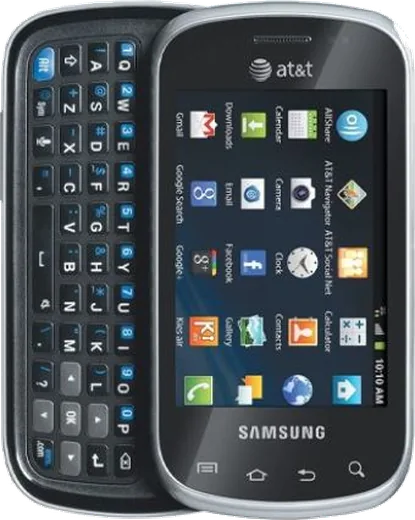
WhatsApp on Samsung Galaxy Appeal I827
Samsung Android

WhatsApp for Samsung Galaxy Appeal I827

Install the official WhatsApp on your Samsung Galaxy Appeal I827 in a few simple steps.

WhatsApp Messenger 4.7 · 64.2M reviews Free · Android · ~40 MB · by WhatsApp LLC
Download WhatsApp

Ask a question / report a problem

You can ask any question about WhatsApp support on the Samsung Galaxy Appeal I827 — leave it below and we'll help.

Ask a question

Can the Samsung Galaxy Appeal I827 run WhatsApp?

Not supported
  • Operating systemAndroid
  • WhatsApp versionNot supported

Latest known WhatsApp problems on Samsung Galaxy Appeal I827

1

Can I set up WhatsApp on the Samsung Galaxy Appeal I827 as a minimalist slide phone?

The Galaxy Appeal I827 ships with Android 2.3 Gingerbread, which is below WhatsApp's minimum supported version, so the current app will not install or activate from the Play Store. To use WhatsApp you need a phone running at least Android 5.0; on the Appeal, the realistic path is to keep it as a calls and texts device and run WhatsApp on a second phone or tablet that meets the requirement. The hardware QWERTY slider is great for SMS, but the OS is simply too old for modern WhatsApp. See how others solved this on Reddit
2

How do I customize the home screen and launcher on the Galaxy Appeal I827 to make it feel less distracting?

Because it runs old Android, install a lightweight launcher that still supports Gingerbread, or sideload an older compatible APK. To switch defaults, first clear the current launcher under Settings > Applications > Manage applications > select the launcher > Clear defaults, then press Home and choose the new launcher. Strip the home screen down to phone, messaging, and a clock widget only, and move everything else into the app drawer. This gives a stripped-back, customizable slide-phone experience without buying new hardware. See how others solved this on Reddit
3

The physical slide-out keyboard on my Galaxy Appeal I827 has stopped responding or feels loose — what can I do?

On these sliders the keyboard connects through a thin ribbon cable that loosens with repeated opening, so keys that register intermittently usually mean the ribbon or slide contacts need reseating rather than a software fix. Power down, gently open and close the slider a few times to help re-seat the connector. If the hardware keys fully fail, you can still type using the on-screen keyboard, which becomes available automatically when the slider is closed; confirm the input method under Settings > Language & keyboard. A persistent failure points to a worn ribbon cable that a repair shop can replace. See how others solved this on Reddit
4

My Galaxy Appeal I827 battery drains very fast — how do I extend it for daily use?

On Gingerbread, go to Settings > Wireless & networks and turn off Wi-Fi, Bluetooth, and mobile data when not needed, then set Settings > Display > Brightness to a low manual level and shorten the screen timeout. Check Settings > About phone > Battery use to see which app is draining power, and disable background sync under Settings > Accounts & sync. After years of use the original battery has likely degraded, so a fresh OEM-compatible replacement is the biggest single improvement. See how others solved this on Reddit
5

How do I free up storage on the Galaxy Appeal I827 when it says memory is full?

The Appeal has very little internal storage, so move apps that allow it to the microSD card via Settings > Applications > Manage applications > select an app > Move to SD card, and set the camera to save photos to the SD card in the camera settings. Clear cached data under Settings > Applications > Manage applications by tapping individual apps and choosing Clear cache, and delete old MMS threads, which build up quickly. A larger microSD card formatted in the phone gives the most headroom. See how others solved this on Reddit
6

Can I still get apps onto the Galaxy Appeal I827 now that the Play Store rejects most of them?

Modern Play Store listings hide apps that are incompatible with Android 2.3, so most current apps will not appear or install on the Appeal. Sign in with your Google account under Settings > Accounts & sync, then look specifically for older legacy versions, or sideload a Gingerbread-compatible APK by enabling Settings > Applications > Unknown sources and opening the file from your downloads. Stick to lightweight, offline-capable tools, since this device is best treated as a focused calls, texts, and basic-utility phone. See how others solved this on Reddit

Ask a question / report a problem

You can ask any question about WhatsApp support on the Samsung Galaxy Appeal I827 — leave it below and we'll help.

Ask a question

Watch: setting up WhatsApp

Prefer to watch? This short walkthrough shows the whole installation and number-verification flow.

How to install WhatsApp on Samsung Galaxy Appeal I827 — video walkthrough

How to install WhatsApp on Samsung Galaxy Appeal I827

1

Choose how to download

On your Samsung Galaxy Appeal I827 you can get the official app two ways: from the Google Play Store — the easiest option, since it keeps WhatsApp updated automatically — or directly from the official website. You can download an APK file, by clicking a link “Download WhatsApp directly”.

2

Open WhatsApp

Launch WhatsApp from your home screen or app drawer and accept the Terms of Service to start setup.

3

Verify your phone number

Enter your phone number. If your Samsung Galaxy Appeal I827 uses dual SIM, pick the line you want WhatsApp tied to, then enter the 6-digit code it sends by SMS — it usually fills in automatically.

4

Restore chats and finish setup

Restore your chat history from Google Drive (use the same Google account), add your name and photo, and tap Allow for notifications so messages and calls arrive reliably.

Stay safe: only ever install WhatsApp from the official Android source. The Download button above already points there — modified copies (GB/Plus/Aero WhatsApp) can get your number banned.

Comments (5)

No registration needed. No email required.
N
newphoneJun 27, 2026

Had whatsapp on my Samsung Galaxy Appeal I827 in no time

AppWhatsOfficialJun 29, 2026

Love to hear it!

M
ms_lucaJun 5, 2026

super easy, mein appeal i827 ist startklar 🙏

M
mia.qOct 15, 2025

hey can i use the same number on two phones thanks

AppWhatsOfficialOct 19, 2025

Happy to help, whatsApp supports linked devices now, so you can use your account on more than one phone. Open Linked Devices in Settings to add another. Feel free to ask if you get stuck.

N
newbieSep 9, 2025

i tried everything pls help meee install whatsapp on appeali827 :(

AppWhatsOfficialSep 11, 2025

You are almost there! Tap Download, allow the install, open WhatsApp and confirm your number.

O
oldschoolFeb 14, 2025

works like a charm on the galaxy appeal i827 lol