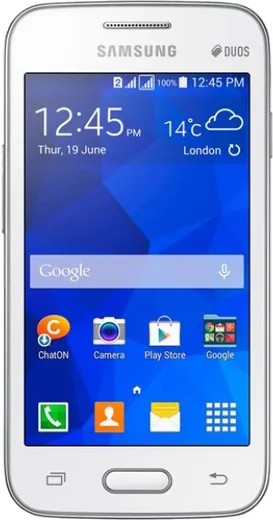
WhatsApp on Samsung Galaxy Ace NXT
Samsung Android

WhatsApp for Samsung Galaxy Ace NXT

Install the official WhatsApp on your Samsung Galaxy Ace NXT in a few simple steps.

WhatsApp Messenger 4.7 · 64.2M reviews Free · Android · ~40 MB · by WhatsApp LLC
Download WhatsApp

Ask a question / report a problem

You can ask any question about WhatsApp support on the Samsung Galaxy Ace NXT — leave it below and we'll help.

Ask a question

Can the Samsung Galaxy Ace NXT run WhatsApp?

Not supported
  • Operating systemAndroid
  • WhatsApp versionNot supported

Latest known WhatsApp problems on Samsung Galaxy Ace NXT

1

How do I remove the "This app has been blocked" or unknown sources warning when installing WhatsApp on my Galaxy Ace NXT?

If you downloaded the WhatsApp APK directly instead of from the Play Store, the Ace NXT blocks it by default. Go to Settings > Security and tick "Unknown sources" to allow the install, then reopen the APK from My Files. For safety it's better to install WhatsApp from the Google Play Store, and untick Unknown sources again once you're done. See how others solved this on Reddit
2

WhatsApp keeps stopping or runs out of storage on my Galaxy Ace NXT - how do I fix it?

The Ace NXT only has about 4GB of internal storage, so WhatsApp media fills it quickly. Insert a microSD card under the back cover, then go to Settings > Application manager > WhatsApp and use "Move to SD card" if available. Inside WhatsApp, open Settings > Chats > Chat history and clear old media, and set the storage/media location to the SD card so photos and voice notes have room to save. See how others solved this on Reddit
3

WhatsApp voice and video calls don't work well on my old Galaxy Ace NXT - is it the phone?

The Ace NXT ships with Android 4.2 Jelly Bean and limited RAM, while current WhatsApp builds require Android 5.0 or newer, so calls may fail or the app may refuse to update. Check your version under Settings > About device; if you're below Android 5.0, WhatsApp will eventually stop supporting your phone. To help calls on a still-supported version, close background apps and stay on Wi-Fi. See how others solved this on Reddit
4

Where are the SIM and microSD slots on the Galaxy Ace NXT for setting up WhatsApp on my number?

The Ace NXT has no side tray - pop off the back cover and remove the battery to reach the SIM and microSD slots underneath. Insert your SIM, boot up, and WhatsApp will read the number when you verify it by SMS. Add a microSD card in the adjacent slot so WhatsApp can store backups and media off the small internal storage. See how others solved this on Reddit
5

Should I keep using my Galaxy Ace NXT for WhatsApp or upgrade?

The Ace NXT was an entry-level 2014 phone running Android 4.2, and WhatsApp has dropped support for that Android version, so you're left on an outdated app build with no further security or feature updates. If the Play Store shows a WhatsApp update you can't install, that's the sign the phone is past end-of-life. A cheap modern Android (Android 10 or newer) will run current WhatsApp smoothly and restore your chats from a Google Drive backup. See how others solved this on Reddit

Ask a question / report a problem

You can ask any question about WhatsApp support on the Samsung Galaxy Ace NXT — leave it below and we'll help.

Ask a question

Watch: setting up WhatsApp

Prefer to watch? This short walkthrough shows the whole installation and number-verification flow.

How to install WhatsApp on Samsung Galaxy Ace NXT — video walkthrough

How to install WhatsApp on Samsung Galaxy Ace NXT

1

Choose how to download

On your Samsung Galaxy Ace NXT you can get the official app two ways: from the Google Play Store — the easiest option, since it keeps WhatsApp updated automatically — or directly from the official website. You can download an APK file, by clicking a link “Download WhatsApp directly”.

2

Open WhatsApp

Launch WhatsApp from your home screen or app drawer and accept the Terms of Service to start setup.

3

Verify your phone number

Enter your phone number. If your Samsung Galaxy Ace NXT uses dual SIM, pick the line you want WhatsApp tied to, then enter the 6-digit code it sends by SMS — it usually fills in automatically.

4

Restore chats and finish setup

Restore your chat history from Google Drive (use the same Google account), add your name and photo, and tap Allow for notifications so messages and calls arrive reliably.

Stay safe: only ever install WhatsApp from the official Android source. The Download button above already points there — modified copies (GB/Plus/Aero WhatsApp) can get your number banned.

Comments (6)

No registration needed. No email required.
B
bea6Apr 13, 2026

gracias, mi galaxy ace nxt ya tiene whatsapp 😍

M
marc_samFeb 18, 2026

well set up whatsapp on my dads Samsung Galaxy Ace NXT no problem

P
pete.nSep 4, 2025

Good job whoever made this 🔥

AppWhatsOfficialSep 7, 2025

Perfect, enjoy chatting!

S
sam66Sep 2, 2025

ugh i NEED this app pleaseeee how do i do it :(

AppWhatsOfficialSep 4, 2025

No panic needed. The Download button takes you to the official app, then just install and verify your number.

I
im_kaiJul 13, 2025

omg smooth install on the ace nxt lol

C
chris.oSep 7, 2024

finally whatsapp is working on my Galaxy Ace NXT now 💯