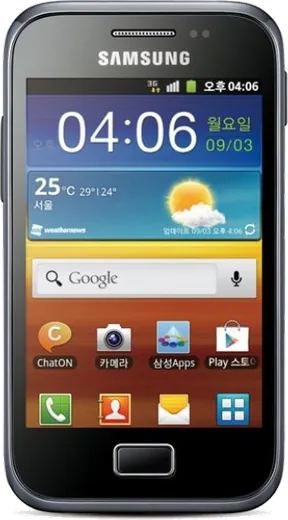
WhatsApp on Samsung Galaxy Ace Advance S6800
Samsung Android

WhatsApp for Samsung Galaxy Ace Advance S6800

Install the official WhatsApp on your Samsung Galaxy Ace Advance S6800 in a few simple steps.

WhatsApp Messenger 4.7 · 64.2M reviews Free · Android · ~40 MB · by WhatsApp LLC
Download WhatsApp

Ask a question / report a problem

You can ask any question about WhatsApp support on the Samsung Galaxy Ace Advance S6800 — leave it below and we'll help.

Ask a question

Can the Samsung Galaxy Ace Advance S6800 run WhatsApp?

Not supported
  • Operating systemAndroid
  • WhatsApp versionNot supported

Latest known WhatsApp problems on Samsung Galaxy Ace Advance S6800

1

Why am I not receiving any WhatsApp messages on my Galaxy Ace Advance S6800 unless I open the app?

On a low-RAM Gingerbread phone like the Ace Advance, Android often shuts WhatsApp down in the background to free memory, so messages only arrive when you reopen the app. Make sure a stable Wi-Fi or mobile data connection is active, and close other running apps via the task manager (hold the Home key) to leave enough free memory. Also open Settings > Accounts and sync and confirm Auto-sync data is enabled so the app can stay connected in the background. See how others solved this on Reddit
2

Why do my WhatsApp notifications only show up late or when I unlock the Galaxy Ace Advance S6800?

Delayed notifications are usually caused by the data connection dropping while the screen is off. Open Settings > Accounts and sync and turn on Auto-sync data so WhatsApp keeps its connection alive. Also check Settings > Wireless and networks > Mobile networks and make sure Data enabled is on, and avoid Power saving features that cut background data when the screen sleeps. Staying on Wi-Fi where possible keeps the push connection steady. See how others solved this on Reddit
3

WhatsApp notifications stopped making a sound or showing on my Galaxy Ace Advance S6800 after an update, how do I fix it?

After an update WhatsApp's in-app notification settings often reset, so fix it inside the app first: tap Menu > Settings > Notifications and re-enable the message tone, vibration, and light for both messages and groups. Then check Settings > Sound to make sure the phone isn't on Silent or Vibrate-only. Toggling the notification setting off and back on once forces it to re-register. See how others solved this on Reddit
4

Why does Samsung keep struggling with WhatsApp notifications and what actually fixes it on the Galaxy Ace Advance S6800?

The recurring cause is the connection or the app being put to sleep in the background. The most reliable fix is to keep WhatsApp connected: enable Auto-sync data under Settings > Accounts and sync and turn off Power saving mode under Settings. If notifications stay broken, clear WhatsApp's data or reinstall it from the Play Store, which re-registers it with the notification server. See how others solved this on Reddit
5

Can I hide the message text in WhatsApp notifications on the Galaxy Ace Advance S6800 for privacy?

WhatsApp itself doesn't let you remove the preview text on this older Android version, but you can stop the notification from showing message content. Open WhatsApp > Menu > Settings > Notifications and turn off High priority notifications and the notification light/popup options so only a generic icon appears in the status bar. To hide content fully you can disable WhatsApp's notifications under Settings > Applications and rely on opening the app to check messages. See how others solved this on Reddit

Ask a question / report a problem

You can ask any question about WhatsApp support on the Samsung Galaxy Ace Advance S6800 — leave it below and we'll help.

Ask a question

Watch: setting up WhatsApp

Prefer to watch? This short walkthrough shows the whole installation and number-verification flow.

How to install WhatsApp on Samsung Galaxy Ace Advance S6800 — video walkthrough

How to install WhatsApp on Samsung Galaxy Ace Advance S6800

1

Choose how to download

On your Samsung Galaxy Ace Advance S6800 you can get the official app two ways: from the Google Play Store — the easiest option, since it keeps WhatsApp updated automatically — or directly from the official website. You can download an APK file, by clicking a link “Download WhatsApp directly”.

2

Open WhatsApp

Launch WhatsApp from your home screen or app drawer and accept the Terms of Service to start setup.

3

Verify your phone number

Enter your phone number. If your Samsung Galaxy Ace Advance S6800 uses dual SIM, pick the line you want WhatsApp tied to, then enter the 6-digit code it sends by SMS — it usually fills in automatically.

4

Restore chats and finish setup

Restore your chat history from Google Drive (use the same Google account), add your name and photo, and tap Allow for notifications so messages and calls arrive reliably.

Stay safe: only ever install WhatsApp from the official Android source. The Download button above already points there — modified copies (GB/Plus/Aero WhatsApp) can get your number banned.

Comments (6)

No registration needed. No email required.
T
tan1990Jun 3, 2026

couldnt install whatsapp on my samsung galaxy ace advance s6800 until i found this :)

AppWhatsOfficialJun 7, 2026

Great to hear it worked out!

C
chris_lucJul 15, 2025

me funcionó al instante en mi galaxy ace advance S6800 👍

X
xX_joeMay 7, 2025

whatsapp works fine on my ace advance s6800

N
newphoneMar 7, 2025

SOS i cant figure out how to install whatsapp heeelp 😩

AppWhatsOfficialMar 10, 2025

We are here to help. Hit Download, follow the steps on this page, and if the code is slow just request it again. Reply here if you get stuck.

N
not_andyJan 30, 2025

yo whatsapp finally on my Galaxy Ace Advance S6800 👍

M
mr_chrisOct 26, 2024

ngl this fixed whatsapp on my samsung galaxy ace advance s6800