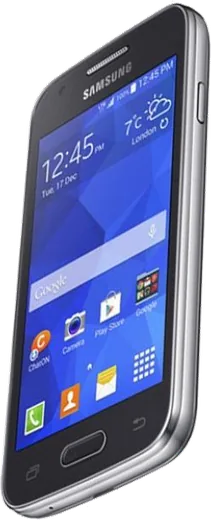
WhatsApp on Samsung Galaxy Ace 4 LTE
Samsung Android

WhatsApp for Samsung Galaxy Ace 4 LTE

Install the official WhatsApp on your Samsung Galaxy Ace 4 LTE in a few simple steps.

WhatsApp Messenger 4.7 · 64.2M reviews Free · Android · ~40 MB · by WhatsApp LLC
Download WhatsApp

Ask a question / report a problem

You can ask any question about WhatsApp support on the Samsung Galaxy Ace 4 LTE — leave it below and we'll help.

Ask a question

Can the Samsung Galaxy Ace 4 LTE run WhatsApp?

Not supported
  • Operating systemAndroid
  • WhatsApp versionNot supported

Latest known WhatsApp problems on Samsung Galaxy Ace 4 LTE

1

Why does WhatsApp vibrate on my Galaxy Ace 4 LTE even when the phone is on silent?

On the KitKat-based Ace 4, WhatsApp keeps its own in-app vibration setting that ignores the system silent profile, so you have to turn it off inside WhatsApp. Open WhatsApp, tap the menu (three dots) > Settings > Notifications, then set Vibrate to Off under both Message notifications and Group notifications. After that the app will follow the phone's profile instead of buzzing on its own. See how others solved this on Reddit
2

Is the Galaxy Ace 4 LTE still usable today, or is it too old for WhatsApp?

Like other very old Samsungs, the Ace 4 runs Android 4.4 KitKat, which current WhatsApp builds no longer support, so the app may refuse to update or open. If it still launches, keep it lean: clear its cache via Settings > Application manager > WhatsApp > Clear cache, and turn off media auto-download under WhatsApp > Settings > Data and storage usage. For reliable long-term use you will eventually need a newer phone, since WhatsApp's minimum Android version keeps rising past KitKat. See how others solved this on Reddit
3

Why do I get an echo during WhatsApp voice calls on my Galaxy Ace 4 LTE?

Echo on this phone is usually the earpiece or loudspeaker feeding back into the mic, and it gets worse on speakerphone. Lower the in-call volume, use a wired headset, and avoid speakerphone in echoey rooms. Also make sure WhatsApp has microphone access under Settings > Application manager > WhatsApp > Permissions, and gently clear any dust from the bottom mic hole so the older hardware picks up less feedback. See how others solved this on Reddit
4

My Galaxy Ace 4 LTE has gotten really slow and laggy with WhatsApp open - how do I fix it?

The Ace 4 has only about 1GB of RAM and limited internal storage, so a chat-heavy WhatsApp quickly fills both. Free space by clearing old conversations (open a chat > menu > More > Clear chat) and emptying the cache via Settings > Application manager > WhatsApp > Clear cache. Turning off Auto-download for photos and videos under WhatsApp > Settings > Data and storage usage keeps the gallery from clogging the small internal storage and keeps the phone responsive. See how others solved this on Reddit
5

WhatsApp notifications are delayed or don't arrive on my Galaxy Ace 4 LTE - what's wrong?

On KitKat the background data and power limits in TouchWiz can suspend WhatsApp when the screen is off. Allow background data under Settings > Data usage > WhatsApp (make sure Restrict background data is unchecked), and avoid task-killer apps that close it. Also confirm notifications are enabled in WhatsApp > Settings > Notifications, and keep Wi-Fi alive during sleep via Settings > Wi-Fi > menu > Advanced > Keep Wi-Fi on during sleep > Always. See how others solved this on Reddit

Ask a question / report a problem

You can ask any question about WhatsApp support on the Samsung Galaxy Ace 4 LTE — leave it below and we'll help.

Ask a question

Watch: setting up WhatsApp

Prefer to watch? This short walkthrough shows the whole installation and number-verification flow.

How to install WhatsApp on Samsung Galaxy Ace 4 LTE — video walkthrough

How to install WhatsApp on Samsung Galaxy Ace 4 LTE

1

Choose how to download

On your Samsung Galaxy Ace 4 LTE you can get the official app two ways: from the Google Play Store — the easiest option, since it keeps WhatsApp updated automatically — or directly from the official website. You can download an APK file, by clicking a link “Download WhatsApp directly”.

2

Open WhatsApp

Launch WhatsApp from your home screen or app drawer and accept the Terms of Service to start setup.

3

Verify your phone number

Enter your phone number. If your Samsung Galaxy Ace 4 LTE uses dual SIM, pick the line you want WhatsApp tied to, then enter the 6-digit code it sends by SMS — it usually fills in automatically.

4

Restore chats and finish setup

Restore your chat history from Google Drive (use the same Google account), add your name and photo, and tap Allow for notifications so messages and calls arrive reliably.

Stay safe: only ever install WhatsApp from the official Android source. The Download button above already points there — modified copies (GB/Plus/Aero WhatsApp) can get your number banned.

Comments (7)

No registration needed. No email required.
N
nina_danMay 14, 2026

Update i had to enable unknown sources but then it was fine 🎉

S
speedyMar 10, 2026

Davvero facilissimo, fatto in 2 minuti sul mio ace 4 lte

N
noobmasterJan 2, 2026

omg best guide for the galaxy ace 4 lte by far

H
heeeelpSep 12, 2025

My new Samsung Galaxy Ace 4 LTE is all set up now 🎉

AppWhatsOfficialSep 13, 2025

Happy it helped you!

M
mia92Jul 11, 2025

anyone? will this really work on my Samsung Galaxy Ace 4 LTE

AppWhatsOfficialJul 14, 2025

Sure, yes, WhatsApp supports the your phone. Just make sure your phone is on an up to date version of its operating system for the best experience.

N
nick_rayJun 18, 2025

very clear steps thanks again

N
noobmasterJun 17, 2025

omg stuck and so stressed how do i get whatsapp on samsung galaxy ace 4 lte :(

AppWhatsOfficialJun 20, 2025

No panic needed. The Download button takes you to the official app, then just install and verify your number. You got this!