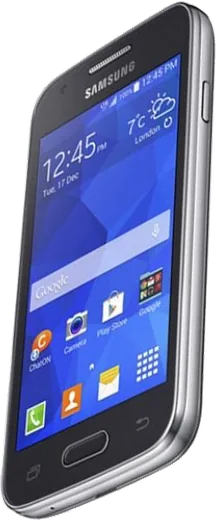
WhatsApp on Samsung Galaxy Ace 4
Samsung Android

WhatsApp for Samsung Galaxy Ace 4

Install the official WhatsApp on your Samsung Galaxy Ace 4 in a few simple steps.

WhatsApp Messenger 4.7 · 64.2M reviews Free · Android · ~40 MB · by WhatsApp LLC
Download WhatsApp

Ask a question / report a problem

You can ask any question about WhatsApp support on the Samsung Galaxy Ace 4 — leave it below and we'll help.

Ask a question

Can the Samsung Galaxy Ace 4 run WhatsApp?

Not supported
  • Operating systemAndroid
  • WhatsApp versionNot supported

Latest known WhatsApp problems on Samsung Galaxy Ace 4

1

Why does WhatsApp vibrate on my Galaxy Ace 4 even when I have vibrate turned off?

On the Ace 4's KitKat build, WhatsApp has its own notification settings that act independently of the phone's sound profile, so it can still vibrate when the system is silent. Open WhatsApp, tap the menu (three dots) > Settings > Notifications and set 'Vibrate' to Off under both Message notifications and Group notifications. If a vibration still fires on calls, check the Call notifications section there too. As a fallback, set the phone to a Silent profile in Settings > Sound rather than just Vibrate. See how others solved this on Reddit
2

WhatsApp keeps crashing or won't work properly on my Samsung Galaxy Ace, how do I fix it?

The Ace's limited RAM and old Android version make WhatsApp unstable once storage and cache fill up. Start with Settings > Application manager > WhatsApp > Clear cache (do not clear data unless your chats are backed up first). Then free internal storage by moving photos to the SD card via My Files, since WhatsApp can fail to launch when storage is nearly full. If it still misbehaves, uninstall and reinstall a last-known compatible version rather than forcing a newer build the hardware can't run. See how others solved this on Reddit
3

Can I still install WhatsApp on the Galaxy Ace 4 running Android 4 KitKat?

Current WhatsApp has dropped support for Android 4.x, so the Play Store version will refuse to install or sign in on the Ace 4. The only working route is to sideload an older compatible WhatsApp APK (one of the last builds that supported KitKat) from a trusted archive, after enabling Settings > Security > Unknown sources. Be aware that WhatsApp periodically cuts off old client versions from its servers, so even a working older build may eventually stop connecting. See how others solved this on Reddit
4

WhatsApp photos aren't showing up in the Gallery on my Ace 4, where are they?

This is usually because WhatsApp's 'Media visibility' setting is off, so newly downloaded photos are kept out of the Gallery's media scan. In WhatsApp go to Settings > Chats and turn on 'Media visibility', then re-download any affected photos. If older images still don't appear, open My Files, browse to the WhatsApp Images folder, and delete any '.nomedia' file inside it, then reboot so the media scanner re-indexes the folder. See how others solved this on Reddit
5

How do I get my photos and WhatsApp media off my old Galaxy Ace 4?

The simplest method is a USB cable: connect the Ace 4 to a computer, pull down the notification shade and tap the USB option to switch from 'Charging' to 'Media device (MTP)', then copy the DCIM and WhatsApp folders from internal storage and the SD card. If the cable won't cooperate, install Google Photos and let it back up over Wi-Fi, then access everything from another device. For just the chat history, use WhatsApp > Settings > Chats > Chat backup before you migrate. See how others solved this on Reddit
6

My Galaxy Ace 4 is sluggish with WhatsApp open, which light apps should I use to keep it usable?

The Ace 4's low RAM means heavy apps choke, so favor lightweight 'Go' or 'Lite' versions and keep WhatsApp on the oldest stable build the phone accepts. Reduce background load via Settings > Application manager > the 'Running' tab and stop apps you don't need, and turn off auto-updates in the Play Store so a bloated update doesn't break a working app. Clearing cache regularly and keeping a few hundred MB of free internal storage makes the biggest difference to messaging speed. See how others solved this on Reddit

Ask a question / report a problem

You can ask any question about WhatsApp support on the Samsung Galaxy Ace 4 — leave it below and we'll help.

Ask a question

Watch: setting up WhatsApp

Prefer to watch? This short walkthrough shows the whole installation and number-verification flow.

How to install WhatsApp on Samsung Galaxy Ace 4 — video walkthrough

How to install WhatsApp on Samsung Galaxy Ace 4

1

Choose how to download

On your Samsung Galaxy Ace 4 you can get the official app two ways: from the Google Play Store — the easiest option, since it keeps WhatsApp updated automatically — or directly from the official website. You can download an APK file, by clicking a link “Download WhatsApp directly”.

2

Open WhatsApp

Launch WhatsApp from your home screen or app drawer and accept the Terms of Service to start setup.

3

Verify your phone number

Enter your phone number. If your Samsung Galaxy Ace 4 uses dual SIM, pick the line you want WhatsApp tied to, then enter the 6-digit code it sends by SMS — it usually fills in automatically.

4

Restore chats and finish setup

Restore your chat history from Google Drive (use the same Google account), add your name and photo, and tap Allow for notifications so messages and calls arrive reliably.

Stay safe: only ever install WhatsApp from the official Android source. The Download button above already points there — modified copies (GB/Plus/Aero WhatsApp) can get your number banned.

Comments (5)

No registration needed. No email required.
M
mmmaaaxxxApr 27, 2026

Wow installé sur le ace 4 de ma mère sans probleme

K
kai99Feb 4, 2026

Guys i dont want people to see im online

AppWhatsOfficialFeb 6, 2026

Hi! In Privacy settings you can set Last Seen and Online to Nobody, so no one sees when you are active. Let us know if you need anything else.

W
whyyyyyNov 19, 2025

Yo running whatsapp on my galaxy ace 4 like new

V
val18May 17, 2025

someone i been trying since morning pleaseee how to install on Samsung Galaxy Ace 4

AppWhatsOfficialMay 21, 2025

You are almost there! Tap Download, allow the install, open WhatsApp and confirm your number.

W
whyyyyyMar 15, 2025

couldnt be easier cheers

AppWhatsOfficialMar 18, 2025

Thanks for the feedback!