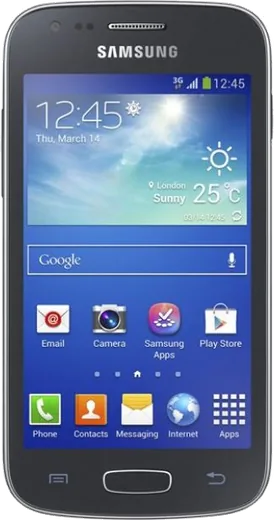
WhatsApp on Samsung Galaxy Ace 3
Samsung Android

WhatsApp for Samsung Galaxy Ace 3

Install the official WhatsApp on your Samsung Galaxy Ace 3 in a few simple steps.

WhatsApp Messenger 4.7 · 64.2M reviews Free · Android · ~40 MB · by WhatsApp LLC
Download WhatsApp

Ask a question / report a problem

You can ask any question about WhatsApp support on the Samsung Galaxy Ace 3 — leave it below and we'll help.

Ask a question

Can the Samsung Galaxy Ace 3 run WhatsApp?

Not supported
  • Operating systemAndroid
  • WhatsApp versionNot supported

Latest known WhatsApp problems on Samsung Galaxy Ace 3

1

WhatsApp won't install or keeps saying it's out of date on my Galaxy Ace 3

The Ace 3 runs Android 4.1/4.2 Jelly Bean, and current WhatsApp dropped support for anything below Android 5.0, so the Play Store version will refuse to update or open. Your only real option is to install an older compatible WhatsApp APK (the 2.19.x era was among the last to run on Android 4.x) from a trusted archive like APKMirror, but be aware these builds eventually stop connecting once WhatsApp ends server support for old clients. Treat this phone as a temporary or backup device for messaging rather than a long-term WhatsApp phone. See how others solved this on Reddit
2

WhatsApp photos aren't showing up in my Samsung Gallery

This usually means the Gallery's media scanner hasn't re-indexed the WhatsApp media folder. In WhatsApp, open Settings > Chats and enable Media visibility so saved photos are exposed to the Gallery. If they still don't appear, restart the phone, which forces the media scanner to re-index the WhatsApp Images folder in internal storage. You can also confirm WhatsApp is set to auto-download/save media under Settings > Chats > Media auto-download. See how others solved this on Reddit
3

My Galaxy Ace 3 is painfully slow and almost unusable, can I make it run better?

With its dual-core CPU and small amount of RAM, the Ace 3 struggles with modern apps, so strip it down. Go to Settings > Application manager, swipe to the All tab, and Disable or uninstall bloatware and anything you don't use. Turn off live wallpapers and widgets, and clear app caches regularly via Settings > Application manager (tap an app > Clear cache). For the smoothest result, do a factory reset from Settings > Backup and reset and only reinstall the few lightweight apps you actually need. See how others solved this on Reddit
4

What light apps and games actually run well on a Samsung Galaxy Ace 3?

Stick to apps built for older, low-RAM Android: look for "Lite" or "Go" editions such as Facebook Lite, Messenger Lite, and Google Go, plus simple offline games that don't need much horsepower. In the Play Store many newer apps won't even show as compatible, so for those you'll need older versions from a trusted archive like APKMirror, picking builds from roughly 2014-2016 that target Android 4.x. Keeping installs minimal also leaves precious internal storage free, which keeps the whole phone more responsive. See how others solved this on Reddit
5

I'm running out of internal storage on my Galaxy Ace 3, what can I do?

The Ace 3 has only a few GB of built-in storage, so insert a microSD card in the slot under the back cover and offload what you can to it. Go to Settings > Application manager, tap a large app, and use Move to SD card where the option is available; also set the Camera to save photos to the SD card in the camera's settings. Regularly clear app caches and delete old WhatsApp media (the WhatsApp Images folder fills up fast) to reclaim space. See how others solved this on Reddit

Ask a question / report a problem

You can ask any question about WhatsApp support on the Samsung Galaxy Ace 3 — leave it below and we'll help.

Ask a question

Watch: setting up WhatsApp

Prefer to watch? This short walkthrough shows the whole installation and number-verification flow.

How to install WhatsApp on Samsung Galaxy Ace 3 — video walkthrough

How to install WhatsApp on Samsung Galaxy Ace 3

1

Choose how to download

On your Samsung Galaxy Ace 3 you can get the official app two ways: from the Google Play Store — the easiest option, since it keeps WhatsApp updated automatically — or directly from the official website. You can download an APK file, by clicking a link “Download WhatsApp directly”.

2

Open WhatsApp

Launch WhatsApp from your home screen or app drawer and accept the Terms of Service to start setup.

3

Verify your phone number

Enter your phone number. If your Samsung Galaxy Ace 3 uses dual SIM, pick the line you want WhatsApp tied to, then enter the 6-digit code it sends by SMS — it usually fills in automatically.

4

Restore chats and finish setup

Restore your chat history from Google Drive (use the same Google account), add your name and photo, and tap Allow for notifications so messages and calls arrive reliably.

Stay safe: only ever install WhatsApp from the official Android source. The Download button above already points there — modified copies (GB/Plus/Aero WhatsApp) can get your number banned.

Comments (5)

No registration needed. No email required.
K
kev_benApr 11, 2026

wow no registration needed, love that ❤️

L
lucy15Nov 9, 2025

finally set up whatsapp on my dads samsung galaxy ace 3 no problem ✌️

H
heeeelpSep 5, 2025

ohne probleme auf meinem ace 3 installiert 💯

P
pete_rayJul 24, 2025

guys worked even on my old phone

P
priya71Oct 12, 2024

I NEED this app pleaseeee how do i do it :(

AppWhatsOfficialOct 14, 2024

Breathe! Follow the steps above one by one, tap Download first, and you will be chatting in no time. You will be set up on your phone in no time.