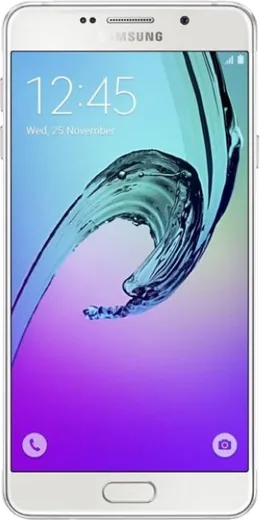
WhatsApp on Samsung Galaxy A7 (2016)
Samsung Android

WhatsApp for Samsung Galaxy A7 (2016)

Install the official WhatsApp on your Samsung Galaxy A7 (2016) in a few simple steps.

WhatsApp Messenger 4.7 · 64.2M reviews Free · Android · ~40 MB · by WhatsApp LLC
Download WhatsApp

Ask a question / report a problem

You can ask any question about WhatsApp support on the Samsung Galaxy A7 (2016) — leave it below and we'll help.

Ask a question

Can the Samsung Galaxy A7 (2016) run WhatsApp?

Fully supported
  • Operating systemAndroid
  • WhatsApp versionLatest supported

Latest known WhatsApp problems on Samsung Galaxy A7 (2016)

1

I broke my Galaxy A7 (2016) and can't get into WhatsApp on my new phone — how do I recover my account and chats?

WhatsApp is tied to your phone number, not the device, so install WhatsApp on the new phone, enter the same number, and confirm the SMS or call verification code to reclaim the account. To restore messages you need the Google Drive backup the old A7 made under WhatsApp > Settings > Chats > Chat backup; if you can still power the cracked A7 on, run a manual backup first, otherwise only chats from the last automatic backup will return. If the phone still boots but the screen is unusable, you can also copy the local backup from a PC — look in Internal storage/Android/media/com.whatsapp/WhatsApp/Databases (older builds use Internal storage/WhatsApp/Databases) and place it on the new phone before reinstalling. See how others solved this on Reddit
2

WhatsApp says 'This account can no longer use WhatsApp' / 'You need a newer version' on my Galaxy A7 (2016) — what do I do?

This usually means either WhatsApp dropped support for the old Android version on the 2016 A7, or your account was blocked for a terms-of-service reason. First open the Play Store and update WhatsApp; if the store says your Android version is too old, that build can no longer be updated and you'll need a newer phone. If the app is current but you're blocked, tap 'Request a review' on the block screen inside the app to appeal — bans for using unofficial mods like GB WhatsApp are common and require switching back to the official app from the Play Store before you can return. See how others solved this on Reddit
3

My Samsung Galaxy A7 has gotten really slow and laggy — how can I speed it up for WhatsApp?

Free up space first, since the A7's storage chokes when nearly full: go to Settings > Device care > Storage and clear cached files, then open WhatsApp > Settings > Storage and data > Manage storage to delete large forwarded videos and photos. Disable or uninstall apps you don't use under Settings > Apps, and turn off media auto-download in WhatsApp > Settings > Storage and data so chats stop filling the phone. As a last resort, a factory reset (Settings > General management > Reset) after backing up your WhatsApp chats to Google Drive often restores noticeable speed on these older models. See how others solved this on Reddit
4

My Galaxy A7's internal storage keeps filling up — can I move WhatsApp data or expand storage with the SD card?

The A7 (2016) takes a microSD card, so insert one and route your camera and downloads to it to relieve internal space. WhatsApp won't relocate its core data to the SD card, but you can keep media off the phone by turning off auto-download (WhatsApp > Settings > Storage and data) and periodically clearing chat media under Manage storage. Neither stock Android nor custom ROMs like LineageOS let you merge the SD card into internal storage on this device, so the practical fix is housekeeping plus moving photos and music to the card. See how others solved this on Reddit
5

Is it worth keeping my old Galaxy A7 or should I replace it just to run WhatsApp?

If WhatsApp still updates from the Play Store and the phone runs without constant crashes, the A7 is fine for messaging — but once WhatsApp's minimum Android requirement passes your version, the app stops working and replacement becomes unavoidable. Before deciding, back up your chats to Google Drive (WhatsApp > Settings > Chats > Chat backup) so your history transfers cleanly to any newer Android phone. Battery wear and storage limits are the usual breaking points on these models, so a cheap modern budget phone will run WhatsApp far more reliably. See how others solved this on Reddit
6

I bought a used Galaxy A7 and it's stuck on a Google account / parental lock — can I still use WhatsApp on it?

That's Google Factory Reset Protection or a Family Link parental lock tied to the previous owner's account, and WhatsApp can't be set up until it's cleared. The only legitimate fix is having the seller sign in to remove their Google account, or release the device from Family Link, then factory reset via Settings > General management > Reset. Without the original owner's credentials Google won't unlock it, so don't pay for any tool claiming an instant bypass — confirm the phone is clean before relying on it for WhatsApp. See how others solved this on Reddit

Ask a question / report a problem

You can ask any question about WhatsApp support on the Samsung Galaxy A7 (2016) — leave it below and we'll help.

Ask a question

Watch: setting up WhatsApp

Prefer to watch? This short walkthrough shows the whole installation and number-verification flow.

How to install WhatsApp on Samsung Galaxy A7 (2016) — video walkthrough

How to install WhatsApp on Samsung Galaxy A7 (2016)

1

Choose how to download

On your Samsung Galaxy A7 (2016) you can get the official app two ways: from the Google Play Store — the easiest option, since it keeps WhatsApp updated automatically — or directly from the official website. You can download an APK file, by clicking a link “Download WhatsApp directly”.

2

Open WhatsApp

Launch WhatsApp from your home screen or app drawer and accept the Terms of Service to start setup.

3

Verify your phone number

Enter your phone number. If your Samsung Galaxy A7 (2016) uses dual SIM, pick the line you want WhatsApp tied to, then enter the 6-digit code it sends by SMS — it usually fills in automatically.

4

Restore chats and finish setup

Restore your chat history from Google Drive (use the same Google account), add your name and photo, and tap Allow for notifications so messages and calls arrive reliably.

Stay safe: only ever install WhatsApp from the official Android source. The Download button above already points there — modified copies (GB/Plus/Aero WhatsApp) can get your number banned.

Comments (5)

No registration needed. No email required.
O
omar.mJan 8, 2026

ok so all good on my a7 now

M
mr_ninaNov 27, 2024

Ugh help meee i pressed everything and nothing 😭 :(

AppWhatsOfficialNov 30, 2024

We are here to help. Hit Download, follow the steps on this page, and if the code is slow just request it again. It is easier than it looks, promise.

M
mike_realSep 25, 2024

wow no annoying ads which is nice 🔥

B
ben_ytSep 23, 2024

franchement tout fonctionne sur mon Galaxy A7, merci beaucoup 🙏

S
sol92Sep 1, 2024

perfect steps for the Samsung Galaxy A7 thanks again