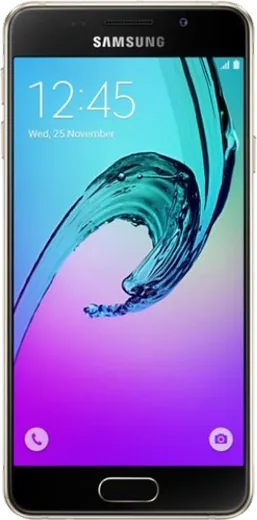
WhatsApp on Samsung Galaxy A3 (2016)
Samsung Android

WhatsApp for Samsung Galaxy A3 (2016)

Install the official WhatsApp on your Samsung Galaxy A3 (2016) in a few simple steps.

WhatsApp Messenger 4.7 · 64.2M reviews Free · Android · ~40 MB · by WhatsApp LLC
Download WhatsApp

Ask a question / report a problem

You can ask any question about WhatsApp support on the Samsung Galaxy A3 (2016) — leave it below and we'll help.

Ask a question

Can the Samsung Galaxy A3 (2016) run WhatsApp?

Support ending soon
  • Operating systemAndroid
  • WhatsApp versionLatest supported

Latest known WhatsApp problems on Samsung Galaxy A3 (2016)

1

WhatsApp photos aren't showing up in my Samsung Gallery on the Galaxy A3 (2016)

In WhatsApp, tap the three-dot menu > Settings > Chats and turn on 'Media visibility' so saved images appear in Gallery; for photos already received, open the chat and tap each image's download arrow. If they still don't show, use a file manager to check there's no '.nomedia' file in Internal storage > WhatsApp > Media > WhatsApp Images, then restart the phone so Gallery re-scans for media. See how others solved this on Reddit
2

My Galaxy A3 (2016) storage is always running low and WhatsApp won't update

Go to Settings > Apps > WhatsApp > Storage and tap 'Clear cache', then inside WhatsApp use Settings > Storage and data > Manage storage to delete large forwarded videos and old media. Offload photos to Google Photos or a microSD card, since the A3's 16GB fills up fast and a nearly full disk blocks WhatsApp from updating or saving new media. See how others solved this on Reddit
3

WhatsApp keeps getting killed in the background on my Galaxy A3 (2016) and I miss messages

Samsung's battery saver aggressively closes background apps. On the A3's TouchWiz/older software go to Settings > Apps > WhatsApp > Battery and choose 'Unrestricted', and remove WhatsApp from any 'Sleeping apps' or 'Deep sleeping apps' list under Settings > Device care/maintenance > Battery. Also keep WhatsApp's notifications enabled so messages arrive in real time instead of only when you open the app. See how others solved this on Reddit
4

Can I run a second copy of WhatsApp safely on my Galaxy A3 (2016)?

The A3 (2016)'s older software may not include Samsung's 'Dual Messenger' feature. The safest options are WhatsApp's official second-account feature (if your app version supports it) or linking your number as a companion device on another phone. Avoid cloned or modified WhatsApp APKs from outside the Play Store, as they can get your number banned and are a real security risk on a device that no longer receives updates. See how others solved this on Reddit
5

Is the Galaxy A3 (2016) still good enough for just calls and WhatsApp?

It handles voice calls and basic text WhatsApp fine, but with only 1.5GB RAM expect slow loading, occasional crashes, and lag in media-heavy chats or video calls. Keep it usable by clearing WhatsApp's cache regularly (Settings > Apps > WhatsApp > Storage), limiting background apps, and treating it as a light secondary phone since it no longer receives security updates. See how others solved this on Reddit
6

Is it worth keeping an old Galaxy A3 (2016) as a minimalist phone for WhatsApp?

Yes, it works well as a low-distraction device. Install only the apps you truly need and keep WhatsApp updated as long as the Play Store still serves a compatible version for the A3's Android version. Free up space by offloading photos to Google Photos and clearing cache via Settings > Apps, and be aware that newer WhatsApp releases will eventually drop support for this old Android version. See how others solved this on Reddit

Ask a question / report a problem

You can ask any question about WhatsApp support on the Samsung Galaxy A3 (2016) — leave it below and we'll help.

Ask a question

Watch: setting up WhatsApp

Prefer to watch? This short walkthrough shows the whole installation and number-verification flow.

How to install WhatsApp on Samsung Galaxy A3 (2016) — video walkthrough

How to install WhatsApp on Samsung Galaxy A3 (2016)

1

Choose how to download

On your Samsung Galaxy A3 (2016) you can get the official app two ways: from the Google Play Store — the easiest option, since it keeps WhatsApp updated automatically — or directly from the official website. You can download an APK file, by clicking a link “Download WhatsApp directly”.

2

Open WhatsApp

Launch WhatsApp from your home screen or app drawer and accept the Terms of Service to start setup.

3

Verify your phone number

Enter your phone number. If your Samsung Galaxy A3 (2016) uses dual SIM, pick the line you want WhatsApp tied to, then enter the 6-digit code it sends by SMS — it usually fills in automatically.

4

Restore chats and finish setup

Restore your chat history from Google Drive (use the same Google account), add your name and photo, and tap Allow for notifications so messages and calls arrive reliably.

Stay safe: only ever install WhatsApp from the official Android source. The Download button above already points there — modified copies (GB/Plus/Aero WhatsApp) can get your number banned.

Comments (4)

No registration needed. No email required.
C
confuuusedMay 30, 2026

Wow cheers for the clear instructions lol

M
ms_ashApr 24, 2026

ugh pleeeease i really need whatsapp on my galaxy a3 today :(

AppWhatsOfficialApr 27, 2026

No panic needed. The Download button takes you to the official app, then just install and verify your number.

I
ivan_pabDec 10, 2024

finalmente installato senza problemi sul mio galaxy a3 🎉

A
amy21Sep 22, 2024

Pls help installed it but it wont open just a black screen pls

AppWhatsOfficialSep 26, 2024

Restart the phone, and if the black screen stays, clear the app data and install the latest build again. Feel free to ask if you get stuck.