WhatsApp on Pixel Fold
Google Pixel Android

WhatsApp for Pixel Fold

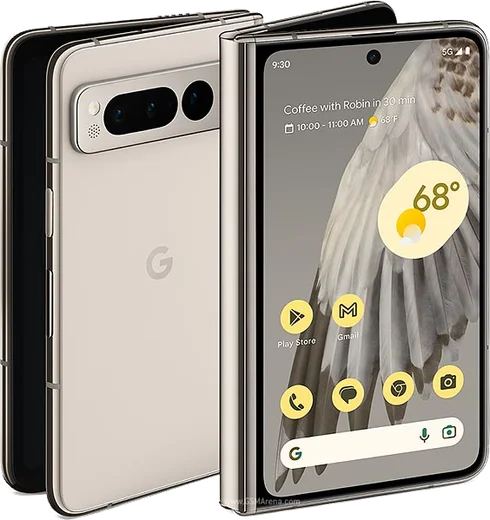
Tensor G2, 7.6-inch foldable OLED, durable hinge

WhatsApp Messenger 4.7 · 64.2M reviews Free · Android · ~40 MB · by WhatsApp LLC
Download WhatsApp

Ask a question / report a problem

You can ask any question about WhatsApp support on the Pixel Fold — leave it below and we'll help.

Ask a question

Can the Pixel Fold run WhatsApp?

Fully supported
  • Operating systemAndroid
  • ProcessorTensor G2
  • WhatsApp versionLatest supported

Latest known WhatsApp problems on Pixel Fold

1

How do I transfer my WhatsApp chats from iPhone to my Pixel Fold?

Google and WhatsApp support an official iOS-to-Android move, but it has to be done during the Pixel Fold's initial setup using a USB-C cable. In the setup wizard choose to copy data from an iPhone and connect the cable, then when you open WhatsApp on the Fold and sign in with the same phone number, follow the prompt to scan the QR code: WhatsApp shows the code on the Fold and you scan it with the iPhone to start the import. If you've already finished setup, you can't add the chats later without factory resetting and running the cable transfer again, since the chat-history import only happens through that initial Switch flow. See how others solved this on Reddit
2

I switched from iPhone to the Pixel Fold and my old WhatsApp chats didn't come over. What can I do?

The cross-platform import only works through the cable-based transfer run during the Fold's initial setup, and it fails if WhatsApp is out of date or if you skip the QR step, so update WhatsApp on both phones and use the official Switch flow before signing in on the Fold. An iCloud WhatsApp backup can't be restored to Android, so if you've already set the Fold up, the practical fallback is to export important threads from the iPhone first: open the chat, tap the contact or group name at the top, choose Export Chat, and email the file to yourself before moving the number over. See how others solved this on Reddit
3

WhatsApp notifications aren't showing up on my Pixel Fold. How do I fix it?

Open Settings > Apps > WhatsApp > Notifications and confirm notifications are allowed and each category (Messages, Group notifications) is on with a sound. Then go to Settings > Apps > WhatsApp > App battery usage and set it to Unrestricted, since Pixel's Adaptive Battery and Doze can hold back a backgrounded app. Finally, inside WhatsApp open Settings > Notifications and make sure the conversations aren't muted and that Do Not Disturb or a Modes schedule isn't suppressing them. See how others solved this on Reddit
4

Why is the picture quality on WhatsApp video calls so bad on my Pixel?

WhatsApp compresses video calls heavily and adapts the resolution to your connection, so a weak or congested network is the most common cause of a soft, blocky image; test the call on a strong Wi-Fi connection to compare. Make sure WhatsApp has Camera permission under Settings > Apps > WhatsApp > Permissions, keep the app updated from the Play Store, and try the larger inner display, which gives the camera preview more to work with than the cover screen. See how others solved this on Reddit
5

My WhatsApp voice and video calls drop or freeze on the Pixel Fold, especially when folding/unfolding. What's wrong?

Switching between the cover and inner display mid-call can interrupt WhatsApp's audio and camera, so start a call and keep it on one display until it ends rather than folding during it. Confirm Microphone and Camera permissions under Settings > Apps > WhatsApp > Permissions, set Settings > Apps > WhatsApp > App battery usage to Unrestricted, and keep WhatsApp updated, since several early Fold call bugs were addressed in later WhatsApp and Pixel firmware updates. See how others solved this on Reddit

Ask a question / report a problem

You can ask any question about WhatsApp support on the Pixel Fold — leave it below and we'll help.

Ask a question

Watch: setting up WhatsApp

Prefer to watch? This short walkthrough shows the whole installation and number-verification flow.

How to install WhatsApp on Pixel Fold — video walkthrough

How to install WhatsApp on Pixel Fold

1

Choose how to download

On your Pixel Fold you can get the official app two ways: from the Google Play Store — the easiest option, since it keeps WhatsApp updated automatically — or directly from the official website. You can download an APK file, by clicking a link “Download WhatsApp directly”.

2

Open WhatsApp

Launch WhatsApp from your home screen or app drawer and accept the Terms of Service to start setup.

3

Verify your phone number

Enter your phone number. If your Pixel Fold uses dual SIM, pick the line you want WhatsApp tied to, then enter the 6-digit code it sends by SMS — it usually fills in automatically.

4

Restore chats and finish setup

Restore your chat history from Google Drive (use the same Google account), add your name and photo, and tap Allow for notifications so messages and calls arrive reliably.

Stay safe: only ever install WhatsApp from the official Android source. The Download button above already points there — modified copies (GB/Plus/Aero WhatsApp) can get your number banned.

Comments (18)

No registration needed. No email required.
N
not_lucyMay 31, 2026

Hi stuck on a black screen after install pls

AppWhatsOfficialJun 3, 2026

Hey there, restart the phone, and if the black screen stays, clear the app data and install the latest build again. Let us know if you need anything else.

T
techguyMay 17, 2026

Someone my whole family is waiting pls help me install it 🙏

AppWhatsOfficialMay 20, 2026

Relax, it is simpler than it looks. Press Download, install, then verify with the SMS code. You got this!

L
leo_mikApr 25, 2026

Pls help why is it downloading so slowly anyone

AppWhatsOfficialMay 1, 2026

Hey there, speed comes down to your data or wifi. On a good connection it only takes a few seconds. Let us know if you need anything else.

M
ms_tinaApr 20, 2026

Davvero facilissimo, fatto in 2 minuti sul mio pixel fold 👍

L
lurkerApr 7, 2026

Finally did it without any help, very simple 👌

L
luca.yApr 7, 2026

Beste seite, hat sofort geklappt auf meinem fold

O
omar42Mar 28, 2026

Guys safe to install or no thanks

AppWhatsOfficialApr 3, 2026

Hi! Yes, it is completely safe. The Download button takes you to the official app on the store, we never host modified versions.

N
nina27Oct 12, 2025

guys this is the only one that worked for me

N
nick77Sep 9, 2025

Hi is old android supported anyone

AppWhatsOfficialSep 15, 2025

Hey there, older phones can work as long as the app is still offered to them. Updating the OS where possible helps a lot. Let us know if you need anything else.

T
tom_ivaAug 25, 2025

guys whatsapp finally on my fold

T
techguyJul 18, 2025

Guys installed in 2 min

A
aliMay 13, 2025

والله سهل جداً بدون مشاكل

D
deni35Apr 28, 2025

restarted the phone and then it installed

L
lina.vApr 20, 2025

best site for this honestly

H
helpmeNov 8, 2024

wow excelente guía, gracias

N
nightowlOct 25, 2024

ok so whatsapp finally on my fold lol

R
rob_joeAug 29, 2024

yo my Pixel Fold has whatsapp now thanks to this

N
nightowlAug 6, 2024

wow great stuff, much appreciated thx