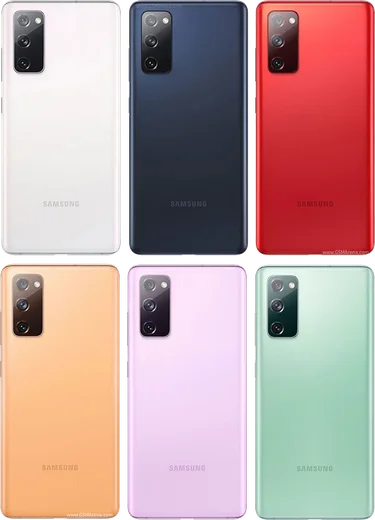
WhatsApp on Samsung Galaxy S20 FE
Samsung Android

WhatsApp for Samsung Galaxy S20 FE

Snapdragon 865, 6.5-inch FHD+ 120Hz AMOLED

WhatsApp Messenger 4.7 · 64.2M reviews Free · Android · ~40 MB · by WhatsApp LLC
Download WhatsApp

Ask a question / report a problem

You can ask any question about WhatsApp support on the Samsung Galaxy S20 FE — leave it below and we'll help.

Ask a question

Can the Samsung Galaxy S20 FE run WhatsApp?

Fully supported
  • Operating systemAndroid
  • ProcessorSnapdragon 865
  • WhatsApp versionLatest supported

Latest known WhatsApp problems on Samsung Galaxy S20 FE

1

WhatsApp call notifications don't pop up on my Galaxy S20 FE — how do I fix it?

Open Settings > Apps > WhatsApp > Notifications and make sure the Calls category is on and set to pop on screen. Then go to Settings > Apps > WhatsApp > Battery and choose Unrestricted so One UI's power saving can't suppress incoming calls. Finally, under Settings > Battery and device care > Battery, turn off any 'Put unused apps to sleep' / 'Auto-disable unused apps' options so WhatsApp keeps running in the background. See how others solved this on Reddit
2

How do I password-protect or lock WhatsApp on my Galaxy S20 FE?

WhatsApp has a built-in fingerprint lock: open WhatsApp > tap the three dots > Settings > Privacy > Fingerprint lock and turn it on (the S20 FE uses its in-display fingerprint sensor). For a PIN, pattern, or extra hiding, add WhatsApp to Samsung's Secure Folder via Settings > Security and privacy > Secure Folder, which keeps a separate locked copy of the app behind your chosen credential. See how others solved this on Reddit
3

I can't tell my WhatsApp notification sound apart from my normal phone notifications on my S20 FE — can I change it?

Give WhatsApp its own distinct tone in Settings > Apps > WhatsApp > Notifications, then open each category (Message notifications, Group notifications) and set a unique Sound. You can also set tones inside WhatsApp under three dots > Settings > Notifications, and assign a custom alert per chat by opening a contact > tap their name > Custom notifications, so WhatsApp never sounds like your phone's default tone. See how others solved this on Reddit
4

How do I run two WhatsApp accounts on my Galaxy S20 FE using Dual Messenger?

Go to Settings > Advanced features > Dual Messenger and toggle WhatsApp on, which creates a second cloned WhatsApp you can register with a different number. If the cloned app keeps signing out or misses notifications, set the WhatsApp clone to Unrestricted under Settings > Apps (find the second WhatsApp instance) > Battery > Unrestricted. Note that a Dual Messenger clone can't also be cloned into Secure Folder at the same time. See how others solved this on Reddit
5

Can I use the same WhatsApp account on both my Galaxy S20 FE and my Galaxy Tab?

Yes — use WhatsApp's Linked Devices: on the S20 FE open WhatsApp > three dots > Linked devices > Link a device. On the tablet, either open web.whatsapp.com in a browser (request desktop site) or install WhatsApp and choose 'Link to existing account', then scan the QR code shown on the phone. The tablet syncs your chats and keeps working even when the phone is offline, since WhatsApp now supports multi-device linking. See how others solved this on Reddit
6

WhatsApp photos and videos aren't saving to my Gallery on the S20 FE — how do I enable it?

In WhatsApp tap three dots > Settings > Chats and turn on Media visibility so downloads appear in Samsung Gallery. Make sure WhatsApp has the Photos and videos (media) permission under Settings > Apps > WhatsApp > Permissions. For a single chat, open it > tap the contact name > Media visibility > Yes. If items still don't show, open Gallery > three dots > Settings and confirm the WhatsApp Images/Video folders aren't hidden. See how others solved this on Reddit

Ask a question / report a problem

You can ask any question about WhatsApp support on the Samsung Galaxy S20 FE — leave it below and we'll help.

Ask a question

Watch: setting up WhatsApp

Prefer to watch? This short walkthrough shows the whole installation and number-verification flow.

How to install WhatsApp on Samsung Galaxy S20 FE — video walkthrough

How to install WhatsApp on Samsung Galaxy S20 FE

1

Choose how to download

On your Samsung Galaxy S20 FE you can get the official app two ways: from the Google Play Store — the easiest option, since it keeps WhatsApp updated automatically — or directly from the official website. You can download an APK file, by clicking a link “Download WhatsApp directly”.

2

Open WhatsApp

Launch WhatsApp from your home screen or app drawer and accept the Terms of Service to start setup.

3

Verify your phone number

Enter your phone number. If your Samsung Galaxy S20 FE uses dual SIM, pick the line you want WhatsApp tied to, then enter the 6-digit code it sends by SMS — it usually fills in automatically.

4

Restore chats and finish setup

Restore your chat history from Google Drive (use the same Google account), add your name and photo, and tap Allow for notifications so messages and calls arrive reliably.

Stay safe: only ever install WhatsApp from the official Android source. The Download button above already points there — modified copies (GB/Plus/Aero WhatsApp) can get your number banned.

Comments (10)

No registration needed. No email required.
N
nightowlMay 20, 2026

Wow trop facile, tout est prêt

O
omar16Dec 5, 2025

a marché parfaitement sur mon Galaxy S20 FE 👍

G
greg6Nov 29, 2025

omg whatsapp works fine on my galaxy s20fe 👌

P
pablo89Nov 21, 2025

Man saved me so much time

N
needwhatsappOct 10, 2025

Ok so my whatsapp had stopped working but this fixed it 🎉

C
chris32Oct 8, 2025

perfect steps for the Galaxy S20 FE

M
mr_leoMay 28, 2025

pls help my phone is a few years old will it work

AppWhatsOfficialJun 2, 2025

Sure, older phones can work as long as the app is still offered to them. Updating the OS where possible helps a lot. Glad to help.

N
nightowlFeb 15, 2025

wow finally got whatsapp running on my Samsung Galaxy S20 FE

T
techguyJan 14, 2025

guys whatsapp works fine on my Galaxy S20 FE

K
kev_ytDec 20, 2024

ugh omggg i cant install it someone heeelp

AppWhatsOfficialDec 23, 2024

We are here to help. Hit Download, follow the steps on this page, and if the code is slow just request it again. You will be set up on your phone in no time.